


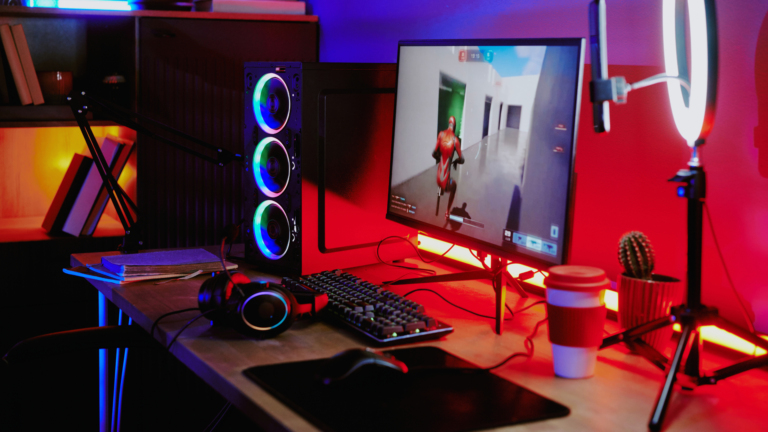
You want a gaming setup that fits your space, budget, and performance goals without guesswork. Start by matching the core components—PC or console, display, audio, and input devices—to how you play and what you can afford, then allocate budget to the parts that most affect experience (GPU/CPU for performance, monitor for clarity and responsiveness, chair/desk for comfort).
They will guide you through choosing parts, arranging ergonomics, and assembling gear so the setup looks and performs the way you expect. Practical tips and clear steps make the build process manageable, whether the plan centers on competitive play, streaming, or a cozy living-room rig.
Step-by-Step Guide to Building Your Gaming Setup
This section breaks the build into concrete choices: core PC parts, display selection, ergonomics, peripherals, tidy cabling, and lighting. Each part lists practical specs, compatibility checks, and cost-conscious options.
Essential PC Components for Modern Gaming
They should prioritize CPU, GPU, memory, storage, motherboard, PSU, and cooling first. For 1080p and 1440p gaming, a mid-range build with an AMD Ryzen 5 5600G or Ryzen 5 7600 and an NVIDIA RTX 4060 offers strong frame rates at sensible prices. For high-refresh 1440p or 4K gaming, target Ryzen 9 7900X or equivalent and an RTX 4080; plan for 16–32GB DDR5 (32GB if multitasking or streaming) and enable XMP/EXPO in BIOS.
Choose an NVMe M.2 SSD (500GB–1TB) for OS and games, plus a 2.5″ SATA SSD or 2–4TB HDD for bulk storage. Match motherboard CPU socket and m.2 slots; check RAM compatibility on the vendor QVL. Use a modular or semi-modular PSU sized for peak wattage—650W for mid-range, 850W+ for top-end or future-proofing—and prefer 80+ Gold efficiency. Apply proper cooling: a Cooler Master Hyper 212 for air, or a 240–360mm AIO liquid cooler for Ryzen 9 / heavy overclocking, and use thermal paste per manufacturer guidance.
Choosing the Right Monitor and Display Options
They must match resolution, refresh rate, and GPU capability. For competitive gamers, a 1080p 240Hz or 1440p 240Hz IPS/G-Sync or FreeSync monitor reduces input lag; look for 1–4 ms response times. For immersive single-player and content creation, choose a 1440p IPS or 4K 144Hz panel; confirm GPU vRAM and throughput—an RTX 4080 or higher handles 4K comfortably.
Check connectors: DisplayPort 1.4 or HDMI 2.1 for high refresh rates and adaptive sync. For color-critical work or streaming, prefer 100% sRGB/95% DCI-P3 coverage. Consider monitor size and desk depth: 27″ for 1440p, 32″+ for 4K. If budget-constrained, aim for the best panel with adaptive sync within the price range and read reviews for HDR and motion handling.
Optimizing Desk, Chair, and Ergonomics
They should prioritize posture, reach, and cable routing. Choose a gaming desk wide enough for monitor(s), keyboard, and mouse pad—at least 48″ for a single 27–32″ monitor and 60″+ for dual setups. Desks with built-in cable trays or grommets simplify cable management; sit-stand desks add long-term health benefits.
Select a chair rated for 8–10+ hour use with lumbar support and adjustable armrests; brands like Corsair or Secretlab, and models with breathable material reduce fatigue. Place the monitor top at eye level and 20–30″ away; keyboard and mouse should keep elbows at ~90°. Use anti-fatigue mats for standing sessions and an anti-static wrist strap while assembling the PC.
Key Peripherals and Accessories Selection
They must pick inputs and capture solutions based on playstyle and streaming needs. For typing and fast response, choose a mechanical keyboard (hot-swap or Cherry MX/Brown/Red switches) from Razer, Corsair, or Logitech. Match a gaming mouse sensor to hand size and DPI needs; read reviews and try sensibilities before buying. Headsets should support spatial audio and comfort—look for 7.1 virtualization or dedicated drivers for clarity in competitive play.
Streamers need a capture card (Elgato 4K60 Pro) and a quality USB/XLR microphone; consider an audio interface or mixer for professional streaming. Add a high-quality mouse pad, spare NVMe/SSD for recordings, and peripherals like a programmable keypad or Stream Deck for production efficiency. Check OS and driver support (Windows 11 recommended for the latest GPU drivers and features).
Cable Management and Battle Station Organization
They should plan cable runs and power distribution before installing components. Use modular PSU cables to eliminate unused wires and route power along case edges with zip ties and Velcro straps. Label cables and use cable sleeves or combs for visible runs; place a cable tray under the desk and secure long runs with adhesive mounts.
Inside the case, tuck SATA and front-panel cables behind the motherboard tray and use the m.2 standoffs for NVMe drives. Keep PSU wattage headroom and use power calculators (PCPartPicker) to verify needs. For peripheral routing, use grommets to bring mouse, keyboard, and headset cables to the desk surface. Test system cooling after cable routing using HWInfo and MSI Afterburner to monitor temps and fan curves.
Lighting, Aesthetics, and Gaming Environment Personalization
They should balance function and style with bias lighting, RGB, and desk placement. Add RGB strips or case fans to highlight the build and choose coordinated colors for peripherals; use software ecosystems (Corsair iCUE, Razer Synapse, Logitech G Hub) for synchronized effects. Bias lighting behind the monitor reduces eye strain and improves perceived contrast.
Keep noise and glare in check: position lights to avoid reflections and choose quiet case fans or an AIO with low-noise pumps. Use cable sleeves, desk mats, and a clean headset stand to maintain a polished battle station. Personalize with storage for controllers, a capture card for console passthrough, and a small shelf for external drives and streaming accessories.



Recent Comments